How to Deploy AI Agents Across Slack, WhatsApp, and Email
Phinite Team · March 2026 · 8 min read
Infrastructure
Enterprise AI
Agentic Systems
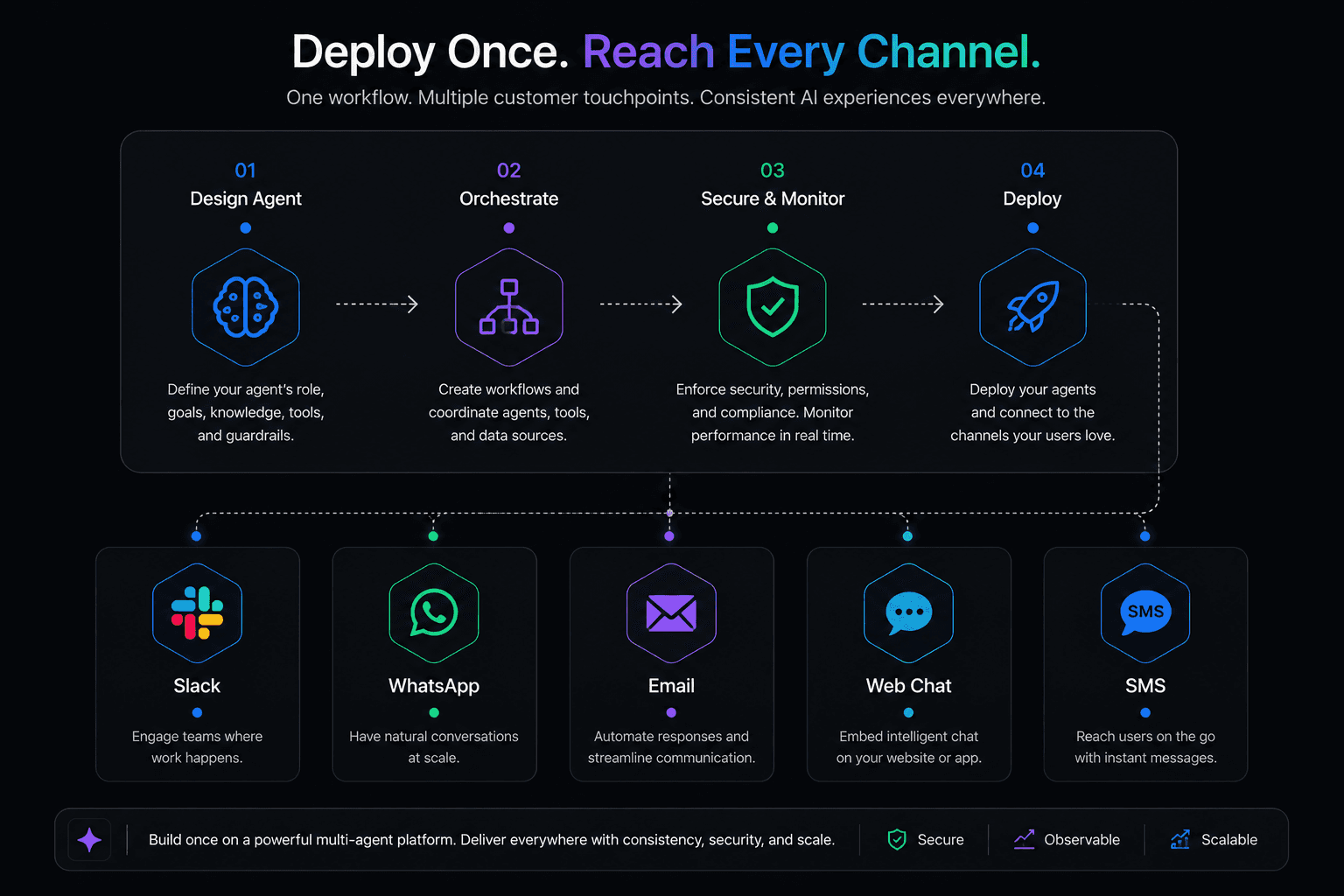
You built an AI agent that works great in a test environment.
Now someone asks:
"Can we put this on Slack? And WhatsApp? And have it respond to emails too?"
That question sounds simple.
It is not.
Multi-channel deployment is where most AI agent projects stall.
The agent logic might be solid, but getting it to work reliably across different platforms, each with its own:
Message formats
Rate limits
Session models
User expectations
Is a different kind of engineering challenge entirely.
This guide walks through how to think about multi-channel deployment, what each major channel requires, and how to avoid the mistakes that trip up most teams.
Why Multi-Channel Matters
Your users are not all in the same place.
A support team lives in Slack.
Customers reach out on WhatsApp.
Partners send emails.
Prospects interact through your website.
If your AI agents only work on one channel, you're forcing users to come to the agent instead of bringing the agent to the users.
That limits adoption, creates friction, and leaves value on the table.
The organizations getting the most from AI agents are deploying them where work already happens, not building separate destinations for AI interactions.
The Architecture Decision
Before you pick channels, you need to decide on your architecture.
There are two main approaches.
Approach 1: Build Each Channel Integration Separately
This means writing custom code for each channel:
A Slack bot
A WhatsApp Business API integration
An email parser
A web chat widget
Each integration handles:
Message formatting
Session management
Delivery
Independently.
When this works
Small teams with one or two channels and strong engineering resources.
You get full control over every detail.
When this breaks down
Adding the third or fourth channel.
Each integration becomes its own codebase to maintain.
Keeping agent behavior consistent across channels gets progressively harder.
Bug fixes need to be applied in multiple places.
Approach 2: Use a Platform with Native Multi-Channel Support
Platforms like Phinite handle channel integrations natively.
You build the agent logic once, and the platform manages:
Message formatting
Delivery
Session continuity
Channel-specific behavior
For:
Slack
WhatsApp
Email
Web
SMS
Custom channels
When this works
Teams deploying to three or more channels, or teams that don't want to invest engineering time in channel plumbing.
When this breaks down
When you need deeply custom behavior for a specific channel that the platform doesn't support.
For most teams, the platform approach saves weeks of integration work.
The custom approach makes sense only when you have unusual channel requirements or a strong preference for building everything yourself.
Channel-by-Channel Guide
Slack
Slack is often the first channel teams deploy AI agents to, because the team is already there and the API is well-documented.
What you need
A Slack app with bot permissions (
chat:write,app_mentions:read,im:history, etc.)Socket Mode or Events API for receiving messages
Block Kit knowledge for rich message formatting
Key considerations
Rate limits
Slack enforces rate limits per workspace and per method.
A busy agent can hit these quickly.
Implement queuing and exponential backoff.
Thread management
Slack conversations happen in threads.
Your agent needs to:
Track thread context
Reply in the correct thread
Know when a new conversation starts vs. continuing an existing one
Message formatting
Slack uses its own markdown variant (mrkdwn).
*bold*becomes boldLinks use Slack formatting
Getting this wrong makes your agent look broken.
Interactive components
Buttons, dropdowns, and modals let users interact with agents beyond text.
These require handling action payloads and responding within Slack's 3-second acknowledgment window.
Permissions and visibility
Decide whether the agent responds in:
DMs
Channels
Both
Channel visibility means everyone sees the interaction, which affects how users behave.
Common mistake
Treating Slack messages like simple text.
They have:
Metadata
Threading context
User IDs
Workspace scoping
That all need proper handling.
WhatsApp is critical for customer-facing agents, especially in markets where WhatsApp is the primary communication channel.
Examples:
Latin America
India
Southeast Asia
Parts of Europe and Africa
What you need
WhatsApp Business API access (through Meta or a Business Solution Provider)
A verified business phone number
Webhook endpoint for receiving messages
Key considerations
24-hour messaging window
After a user sends a message, you have 24 hours to respond freely.
After that, you can only send pre-approved template messages.
This is a hard platform rule.
Template messages need approval
Any proactive outbound message must use a template approved by Meta.
Approval takes 1 to 3 days.
Media handling
WhatsApp supports:
Images
Documents
Audio
Video
Your agent needs to handle incoming media and know when to send media vs. text.
End-to-end encryption
WhatsApp messages are encrypted.
Your integration handles the decrypted content, but you need to be aware of data handling implications for compliance.
Session management
WhatsApp doesn't have threads like Slack.
Each conversation is a continuous stream.
You need to:
Manage context windows
Detect when a user is starting a new topic vs. continuing an old one
Delivery receipts
WhatsApp provides:
Read receipts
Delivery status
Your agent can use these signals, but handling them adds complexity.
Common mistake
Ignoring the 24-hour window.
If your agent takes too long to respond, or if a user returns after a day, you lose the ability to send freeform messages and can only send templates.
Email is the oldest channel and the most nuanced.
Users expect different things from email than from chat.
Responses can be:
Longer
More formal
Less time-sensitive
What you need
IMAP/SMTP access or an email API (SendGrid, Postmark, AWS SES, etc.)
Email parsing logic (subject lines, thread detection, signature stripping, attachment handling)
Reply-to and threading support
Key considerations
Thread detection
Email threads are identified by:
In-Reply-ToReferences
Headers.
Your agent needs to connect incoming emails to existing conversations, not treat every email as a new request.
Signature and disclaimer stripping
Incoming emails contain:
Signatures
Disclaimers
Forwarded content
Quoted text
Your agent needs to extract the actual message from all of that noise.
Response timing expectations
Chat users expect responses in seconds.
Email users are more forgiving, often expecting responses within hours.
This affects how you prioritize processing and can allow for more thoughtful, detailed responses.
Formatting
Emails can be plain text or HTML.
Your agent's responses need to render correctly in:
Outlook
Gmail
Apple Mail
Mobile clients
Which all handle HTML differently.
Attachment handling
Users send:
PDFs
Spreadsheets
Images
Via email.
Your agent needs to either process attachments or gracefully acknowledge that it received them.
Spam and deliverability
If your agent sends outbound emails, you need proper:
SPF
DKIM
DMARC
Records.
Without them, your agent's responses land in spam folders.
Common mistake
Treating email like chat.
Long email threads with complex formatting need sophisticated parsing.
A naive approach that processes the raw email body will misinterpret quoted text as new instructions.
Web Chat
Web chat is the most customizable channel because you control the entire experience.
What you need
A chat widget embedded on your site
WebSocket or polling connection to your agent backend
Session management (anonymous users, returning visitors, authenticated users)
Key considerations
Latency expectations are high
Web chat users expect near-instant responses.
Unlike email, even a 5-second delay feels slow.
Implement streaming responses if possible.
Anonymous vs. authenticated users
You need a strategy for both.
Anonymous visitors might get a limited experience
Authenticated users get full context from their account
Page context
Your chat widget can pass information about:
Which page the user is on
What they've viewed
What actions they've taken
This gives the agent valuable context that other channels lack.
Mobile responsiveness
Your chat widget needs to work on mobile browsers with limited screen space.
Handoff to human
Web chat is where human handoff is most expected.
Your agent needs a clean escalation path when it can't handle a request.
Common mistake
Building a chat widget that looks great on desktop and is unusable on mobile.
Over 60% of web traffic is mobile.
SMS
SMS is simple by design, which makes it both easy and limiting.
What you need
A messaging provider (Twilio, Vonage, Bandwidth, etc.)
A phone number (short code or long code)
Webhook endpoint for incoming messages
Key considerations
160-character limit
Standard SMS has a 160-character limit per segment.
Longer messages get split into multiple segments, which affects cost and delivery order.
No rich formatting
No:
Bold
Link previews
Buttons
Your agent needs to communicate effectively in plain text.
Carrier filtering
Carriers actively filter messages that look like spam.
High-volume SMS from a new number can get blocked.
Proper number registration and content guidelines matter.
Cost per message
SMS has per-message costs that add up.
Unlike chat (which is essentially free per message), SMS costs need to be factored into your unit economics.
Common mistake
Sending agent responses that are too long.
A response that works perfectly in chat becomes an expensive, multi-segment SMS that arrives in the wrong order.
Cross-Channel Architecture Principles
Regardless of which channels you deploy to, a few principles hold.
1. One Agent Logic, Multiple Adapters
Write your core agent logic once.
Create channel-specific adapters that handle:
Message formatting
Delivery
Channel-specific behavior
Don't duplicate agent logic per channel.
2. Unified Session Management
A user who starts a conversation on web chat and follows up via email should have continuity.
Your system needs a way to link sessions across channels, either through:
User identity
Email
Phone number
Account ID
Explicit handoff tokens
3. Channel-Appropriate Response Formatting
The same information gets formatted differently for each channel.
A support response might include:
A clickable button in Slack
A numbered list in email
A brief text in SMS
Build a formatting layer between your agent output and channel delivery.
4. Centralized Observability
When an agent interaction fails, you need to trace it regardless of which channel it came through.
A unified logging and tracing system across all channels is essential.
This is one of the strongest arguments for using a platform that handles multi-channel natively:
You get a single observability dashboard instead of separate logging per channel.
5. Graceful Degradation
If one channel goes down:
Slack's API has outages
WhatsApp's webhook delivery can lag
Your agents on other channels should keep running.
Design for independent channel failures.
The Build vs. Buy Decision
For one or two channels with a small team, building custom integrations is reasonable.
The engineering cost is contained and you maintain full control.
For three or more channels, or if multi-channel is core to your product, a platform approach saves significant time.
Phinite, for example, handles:
Slack
WhatsApp
Email
Web
SMS
Custom channels
Natively.
Which means your team focuses on:
Agent logic
Business rules
Rather than channel plumbing.
The math is straightforward:
If building and maintaining a WhatsApp integration takes your team 3 to 4 weeks, and you need 5 channels, that's 15 to 20 weeks of engineering time before your agents handle a single user interaction.
A platform eliminates most of that timeline.
Getting Started
Pick two channels to start
Don't try to launch everywhere at once.
Start with the channel where the highest-value interactions happen.
Often:
Slack for internal
WhatsApp or Web for external
Build the agent logic channel-agnostic from day one
Even if you're starting with one channel, architect the agent core so it doesn't know or care which channel the message came from.
Test with real users on each channel
Message formatting, timing, and user expectations differ by channel.
What works in a test console often breaks in the real channel.
Monitor per-channel metrics separately
Track independently:
Response time
Resolution rate
User satisfaction
These vary by channel.
Add channels incrementally
Once your first two channels are stable, add the next one.
Each additional channel is easier when the architecture is right.
Frequently Asked Questions
Can one AI agent work across all channels?
Yes, if the architecture separates agent logic from channel delivery.
The agent processes the request the same way regardless of source.
Channel-specific adapters handle formatting and delivery.
Which channel should I deploy to first?
Start where your highest-value interactions happen.
For internal teams: Slack
For customer-facing use cases: Web chat or WhatsApp
Depending on your market.
How do I maintain conversation context across channels?
Link sessions using a shared user identifier:
Email address
Phone number
Account ID
When a user switches channels, the agent retrieves their existing session context from a centralized store.
What's the biggest mistake teams make with multi-channel deployment?
Building channel integrations in isolation, with duplicated agent logic per channel.
This creates maintenance nightmares and inconsistent behavior.
Build the agent once, deliver it through channel adapters.
How does Phinite handle multi-channel deployment?
Phinite provides native integrations for:
Slack
WhatsApp
Email
Web
SMS
Custom channels
You build the agent workflow once using:
Flow Studio
Graph Studio
And the platform handles:
Message formatting
Delivery
Session management
Observability
Across all channels.
Other Blogs
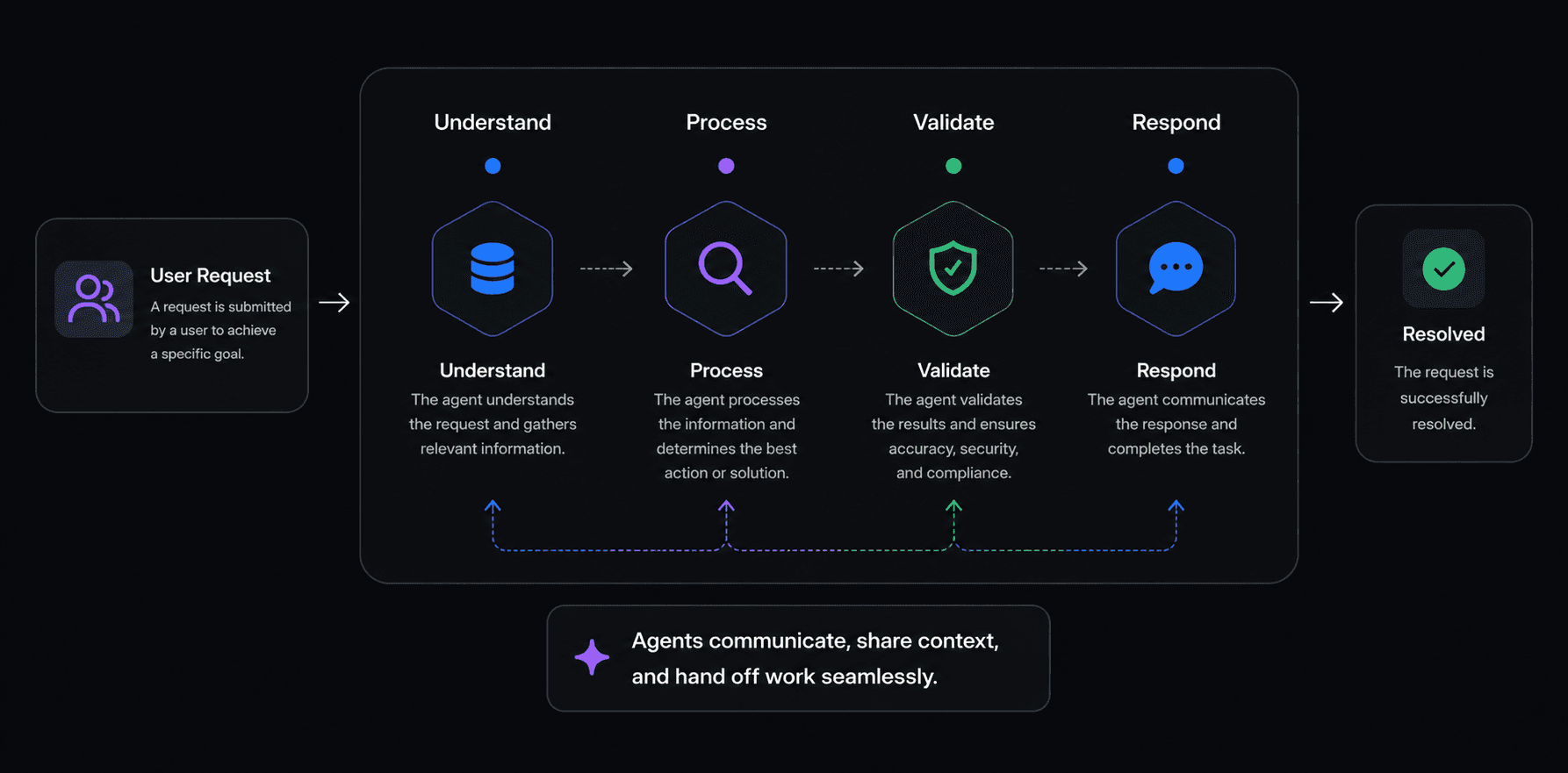
Best Multi-Agent AI Platforms in 2026: An Honest Comparison
CrewAI made a name for itself by making multi-agent AI feel approachable. The idea of defining "crews" of agents with roles, goals, and backstories resonated with developers who wanted something higher-level than raw LangChain but more structured than building from scratch.
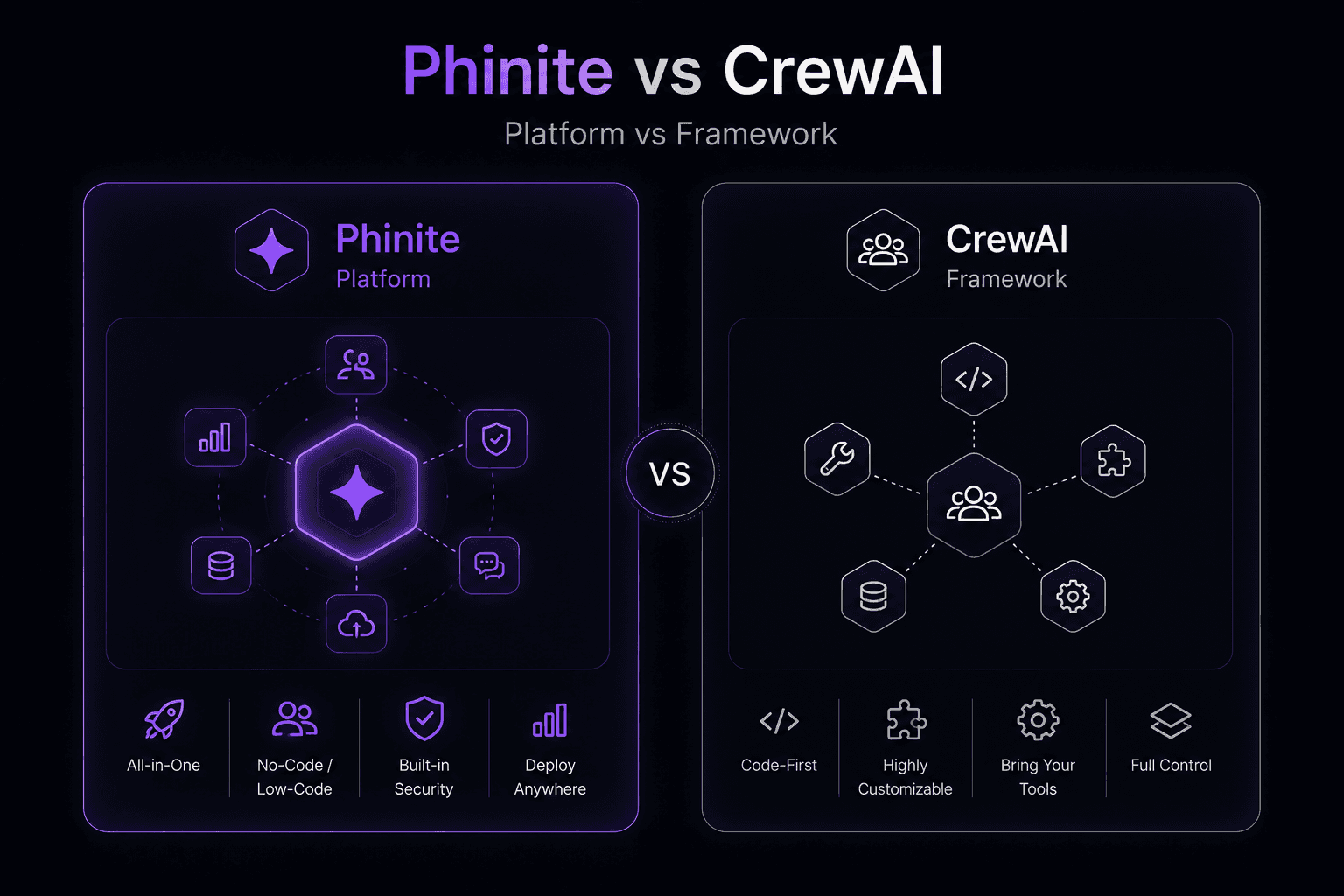
Phinite vs CrewAI: Platform vs Framework for Multi-Agent AI
CrewAI made a name for itself by making multi-agent AI feel approachable. The idea of defining "crews" of agents with roles, goals, and backstories resonated with developers who wanted something higher-level than raw LangChain but more structured than building from scratch.
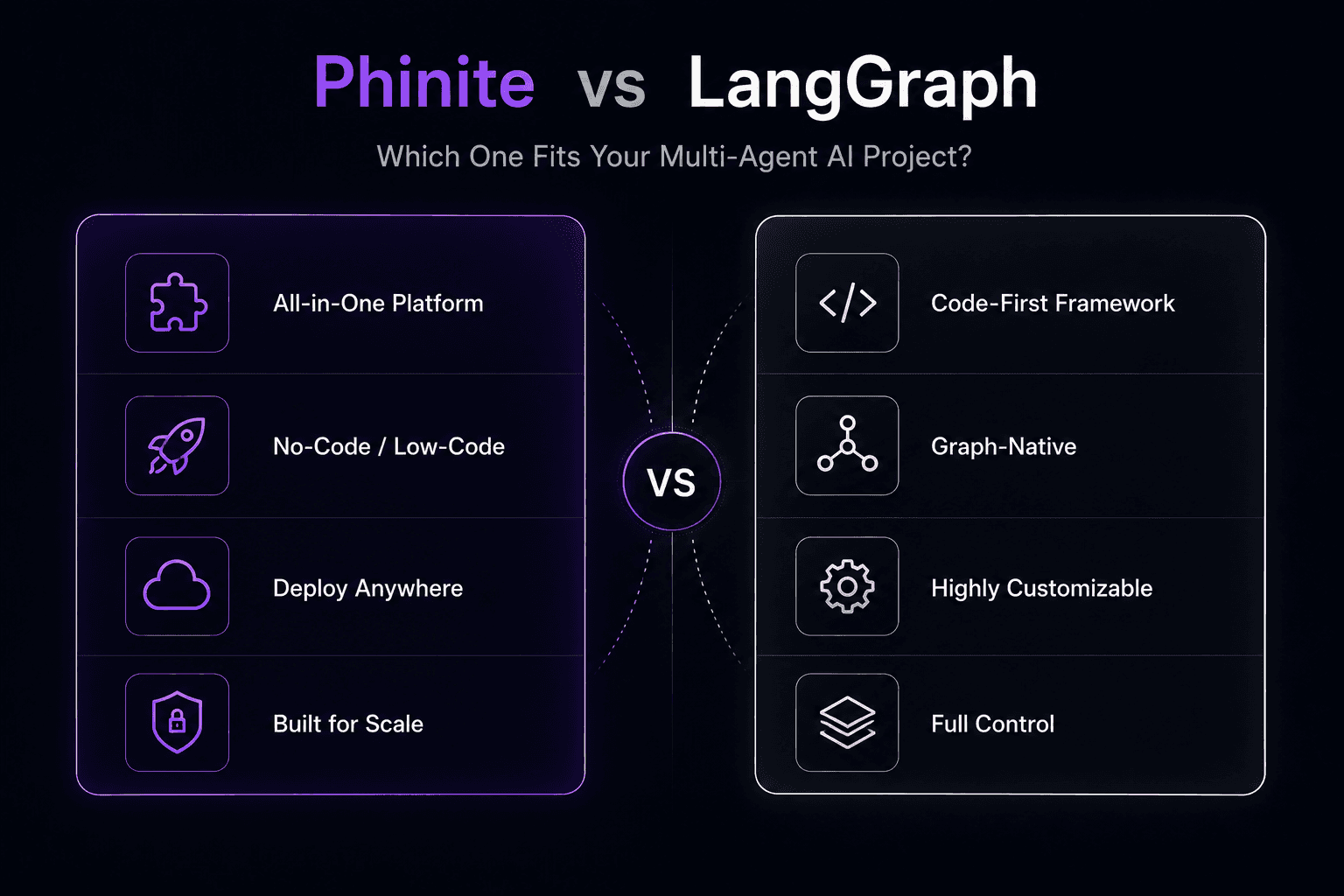
Phinite vs LangGraph: Which One Fits Your Multi-Agent AI Project?
LangGraph has become one of the most widely used tools for building multi-agent AI systems. It's open-source, well-documented, and backed by the LangChain ecosystem. If you've prototyped an agent workflow, there's a decent chance you used LangGraph to do it.